
You may or may not have heard about the latest foodie review app out there.
EATEN.
So, what’s new? What’s unique? Well, as opposed to many typical reviewing sites which tend to review restaurants on the whole, Eaten gives you the opportunity to offer individual reviews for each dish you have tried, including drinks.
For me, the idea of reviewing individual dishes instead of the restaurant/café/bar on the whole is so much more effective. How many times have you been somewhere and had an amazing main and average dessert, or something along those lines? What do you do in that scenario? Give the place a middle-ground rating? 3/5?
If you still don’t really know that it’s all about, this post will take you step by step through all the app’s interesting features, so without further ado, here’s my breakdown of everything you need to know to get you started.
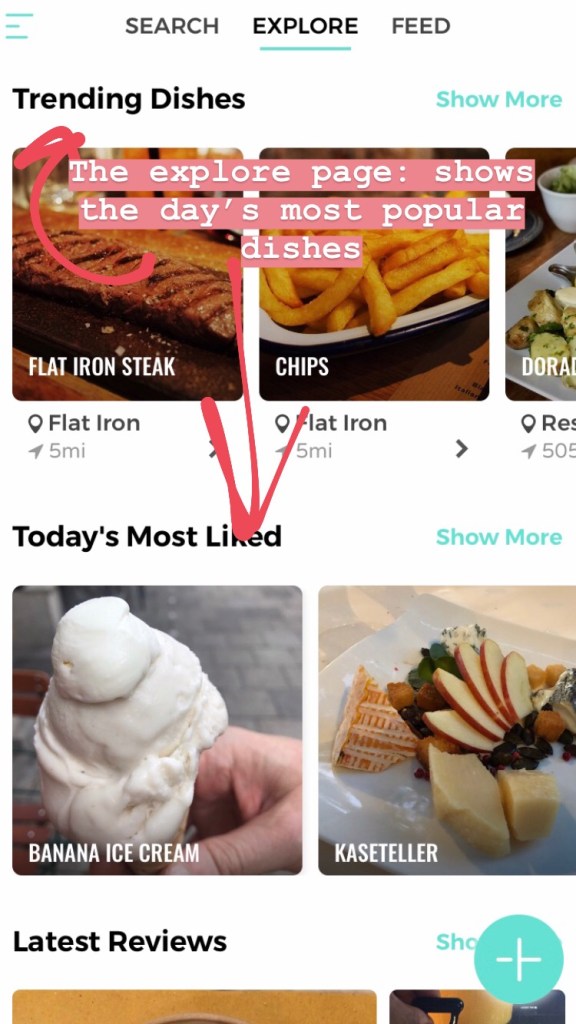
First we have the ‘Explore‘ page. Here you’ll be able to view the latest posts, and most popular dishes.
You can see from the top menu bar that we also have a ‘Feed’ tab. This will show you all the reviews posted by accounts that you have chosen to follow.
‘Search’ shows you your current location, highlighting restaurants, cafés and bars around you that have received reviews, and it also presents a generic search bar to seek out specific restaurants.
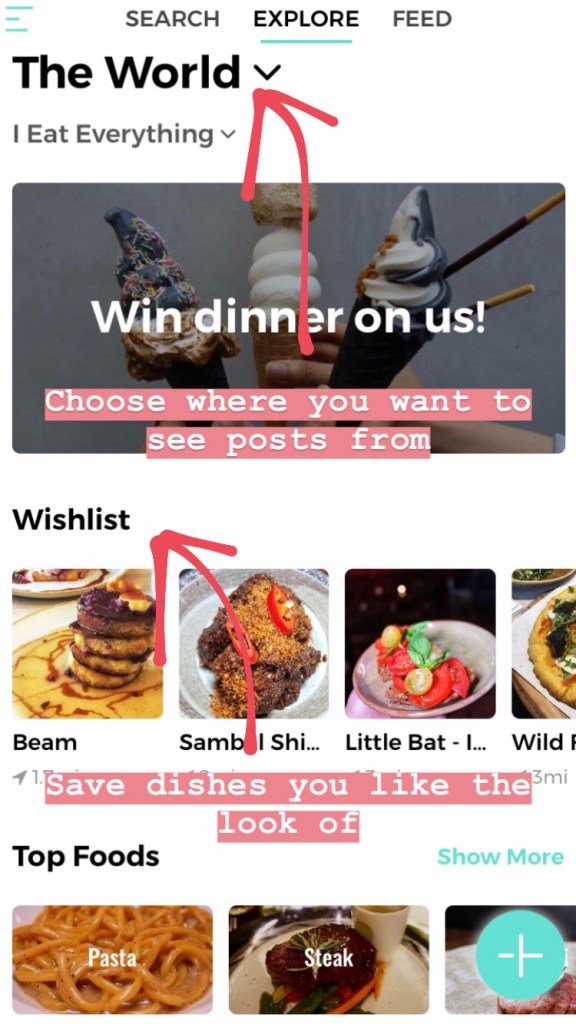
You can change the location to select where you want to view dishes from. I currently have this set to ‘The World’ so that I can see every review that is uploaded, but you can choose a specific city if you wish.
You also have the option to select whether you follow a specific diet, with the options being vegetarian, vegan, halal, kosher and gluten free. If you have selected one of these diets, only dishes that fall into that category will appear on you Explore page.
Once you come across dishes you like the look of, you can save them to your wishlist, and these will be shown on your Explore page as well.
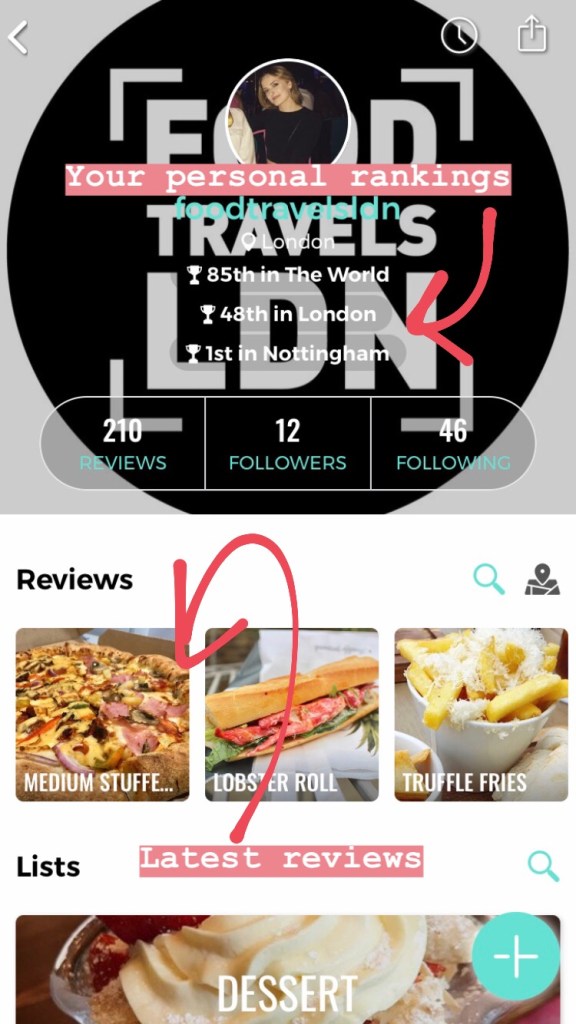
Now we come to your profile. You can choose a profile photo and background image and below that the app will display your rankings locally and globally. I think this is based on the number of reviews you have written but don’t quote me on that.
Next up all your reviews are listed below, starting with the latest.
Below that is one of my favourite features. Your reviews are categorised by the type of dish they fall into. You can see that ‘dessert’ is my most frequently reviewed category as that comes at the top of my page. Once you click on a certain category, all your reviews are shown ranked from best to worst, and these ranking equate to a score for each dish.
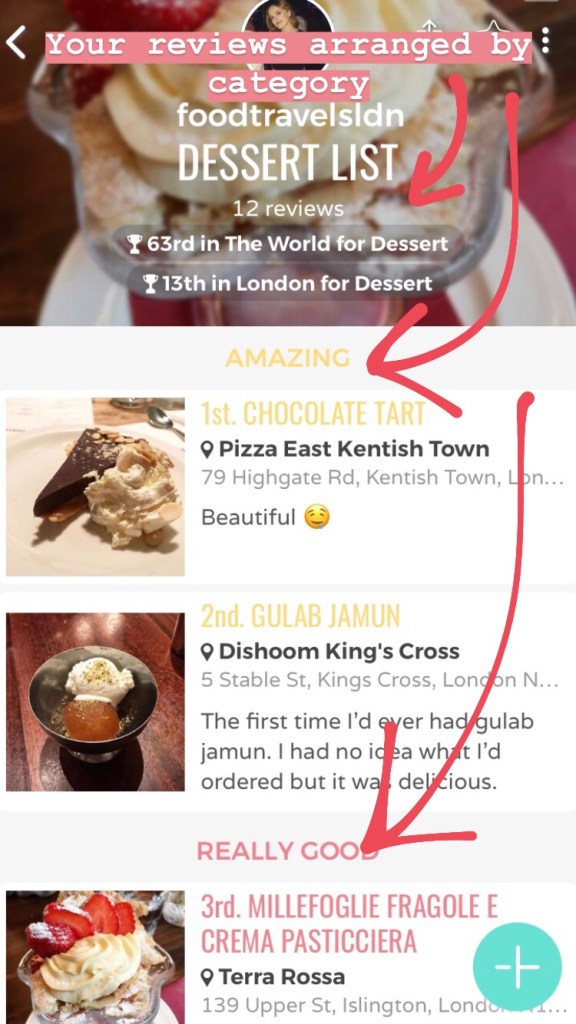
Each dish must be ranked ‘Amazing’, ‘Really good’, ‘Pretty good’, ‘Just ok’ or ‘Not for me’.
The fact that the ‘worst’ category is entitled ‘Not for me’ says a lot about the kind of reviews the app wants to generate. It is not designed for people to berate establishments unnecessarily, and the ‘not for me’ category implies that you may not have enjoyed a dish, but in the sense that it wasn’t to your personal taste. There is no ‘awful’ category, as we well know that our opinions are entirely subjective.
Having said that if you have been massively disappointed, you do have the opportunity to justify your low ranking and explain why in a comments section which you can see below.
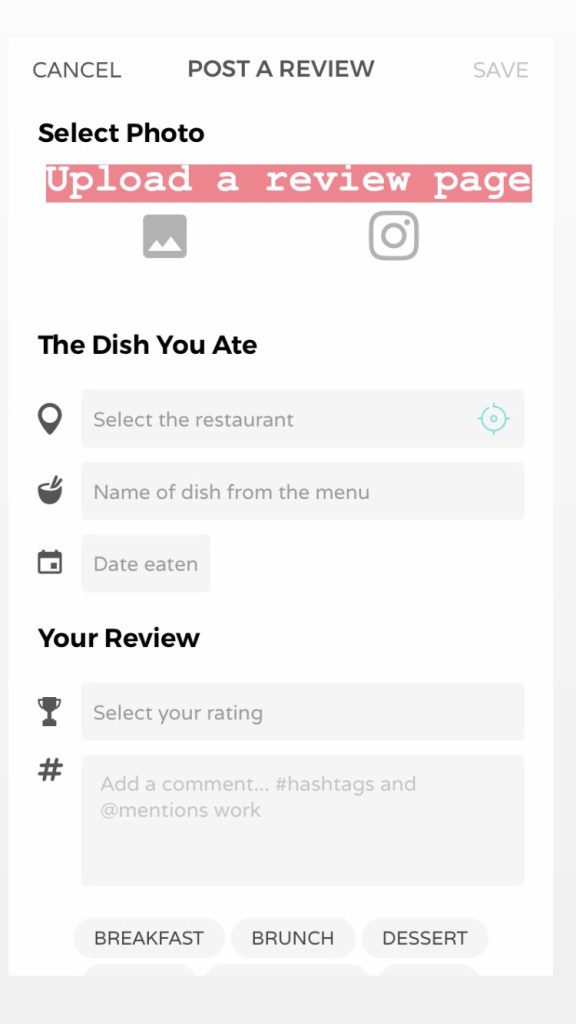
When uploading a new review the screen appears like so.
<——-
You first select a photo (some people haven’t uploaded a photo but these reviews tend to get ignored). To make life a million times easier for us foodies, there is an option to import your images directly from Instagram, and if you have tagged the location on Instagram already, this will automatically be filled in in the ‘restaurant’ section.
Then you must select the name of the dish, and then which category it falls into, i.e. sushi/pizza/ice cream etc.
Date eaten is automatically filled in from when the photo was taken on your phone but you can alter this.
Then comes your rating in one of the 5 categories. You can also rank dishes within the same category, for example, if you have 5 pizzas under ‘really good’, you can change the order to show which of those 5 was the best.
Finally you can add comments and hashtags, although this is not compulsory. For me, I do always prefer reviews that have at least one comment, as it explains the thinking behind how that person has graded their dish.
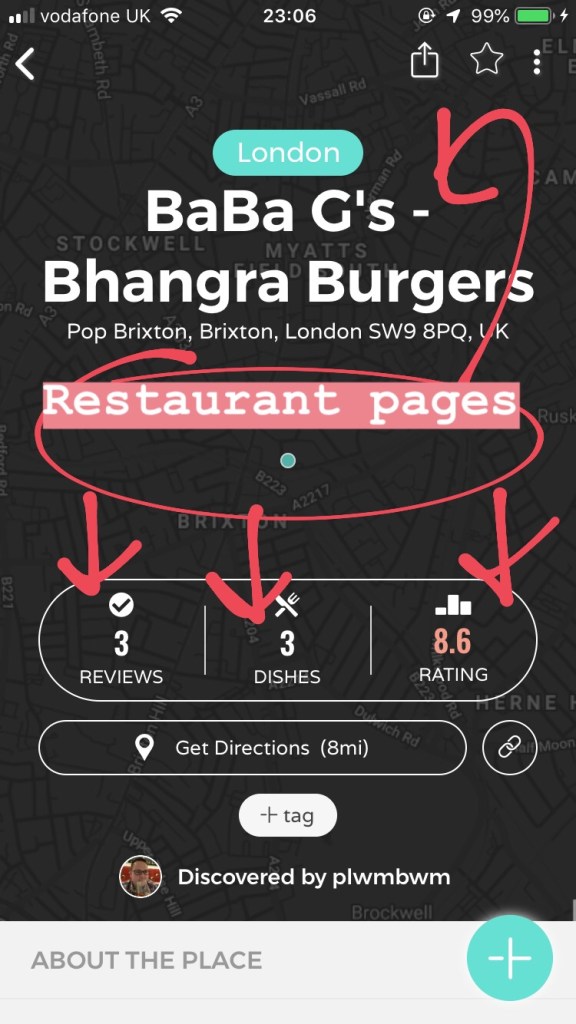
The last part of the app to cover is the restaurants’ personal pages. The vast majority of restaurants etc will have a page even if they don’t yet have reviews. The person to be the first to write a review for that location is said to have ‘discovered’ it as you can see to the right.
You’ll see the location of the restaurant, the number of reviews it already has, how many different dishes these reviews cover and the average rating taken from those dishes.
Scroll down and you will find the reviews themselves.
So that’s pretty much it. I have had this app for just about a week now but I’m already obsessed. It’s still in its early stages so the number of people using it definitely hasn’t peaked yet.
I really urge any foodie out there to engage with it and add their reviews. The more people review, the more useful the app is on the whole. It’s super easy to use and has already extended my ginormous list of places I want to try, and more specifically, dishes I want to taste.
So look no further for your latest foodie fix and…
¡Comemos!
xo
 ¡Comemos!